How to draw on sorteio.com?
Learn how to draw with the most agile and secure platform on the web!
- 1
Log in with your Instagram account
Start by entering your Instagram @profile and email and click next. If you prefer, you can also connect with a Facebook page.
- 2
Select your post from the gallery
Choose the official post of your giveaway from the gallery to define which publication will have its comments loaded.
- 3
Load the comments
From here on, leave it to us! We will load the comments from the selected post, then just click the Draw button and enjoy your giveaway.

The most important settings to successfully run your giveaway!

Step 1
Switch to a Business account

Step 2
Connect Instagram to Facebook
Step 1
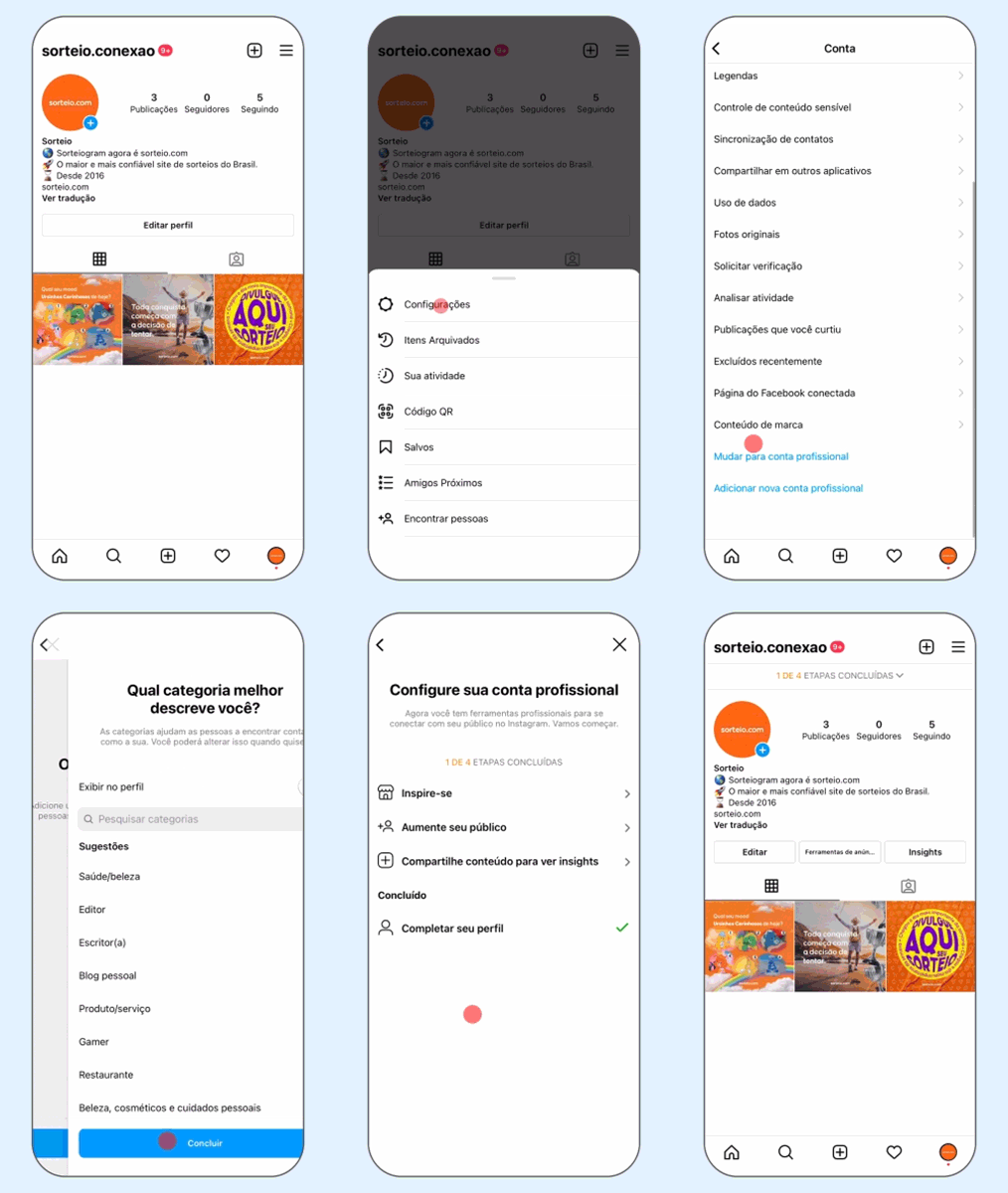
Switch your personal Instagram profile to a business account
Sorteio.com can only interact with business accounts. So before connecting with Facebook, make sure your Instagram account is a business type.
Follow the steps below to complete:
- 1
Open the Instagram app and select your account;
- 2
Go to Menu → Settings → Account → Switch to Professional Account or Switch account type. Follow the instructions. In both cases, choose Professional Profile and not Creator.